


CorrLinks Text Chat
3.3233.00 Reviews
App Specs
- Version
- 3.8.2
- Updated On
- License
- Free
- Downloads
- 50,000+
- Developer
- Advanced Technologies Group, LLC
- Categories
- Communication
- Platform
- Android
Screenshots
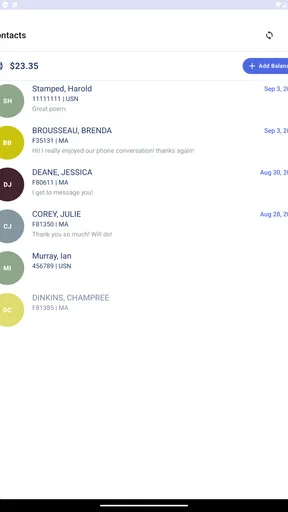
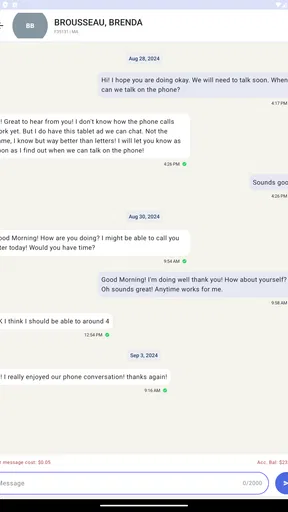
 Analysis by AppCompare
When someone important to you is incarcerated, staying in touch can require more planning than an ordinary text conversation. CorrLinks Text Chat is designed for that particular situation, and I see its value less as a general messaging app than as a practical channel for people who already need to communicate through CorrLinks. The experience can feel direct, but it still operates within the rules and steps involved in communicating with an incarcerated person.
A focused tool for a specific kind of contact
This is a free communication app from Advanced Technologies Group, LLC. It has a 2.7 average from 229 ratings, with 145 written reviews, and more than 10K installs. Those figures suggest that people are using it for a real, specific need, while the modest average rating is a useful reason to approach it with measured expectations rather than assume every conversation will feel effortless. It is rated for Everyone, runs on Android 7.0 or later, and its current version is 3.4.
The central question for a prospective user is whether the person they want to contact can communicate through CorrLinks and whether they are prepared for the approval and monitoring rules that come with that channel. This is not a substitute for ordinary texting with any contact you choose. It makes the most sense when CorrLinks is already the route available to both sides, and when a quicker back-and-forth matters more than the open-ended flexibility of mainstream chat apps.
How it fits into daily communication
For a family member juggling work, errands, and home life, the useful change is having a place to check for messages without treating every exchange like a formal letter. A short update about a schedule, a question that needs an answer, or a few reassuring words can be easier to handle in a chat format than by waiting for conventional mail. I would still think of it as a structured communication channel, not a promise that every message will arrive instantly or that every conversation can happen without interruption.
That distinction matters when setting expectations. If you need to pass on something time-sensitive, I would not make this your only plan; keep an appropriate backup for urgent matters. For everyday connection, though, the chat format can make it easier to maintain a rhythm: answer when you have a moment, pick up the thread later, and avoid turning every small exchange into a carefully composed letter.
Getting Started with CorrLinks
First things first, setting up CorrLinks Text Chat was a breeze. You just need to create an account, and if you’re already using CorrLinks on a browser, you can simply log in with your existing credentials. The interface is pretty straightforward, which I really appreciated. No one wants to fuss around with a complicated setup when all they want is to stay in touch with loved ones.
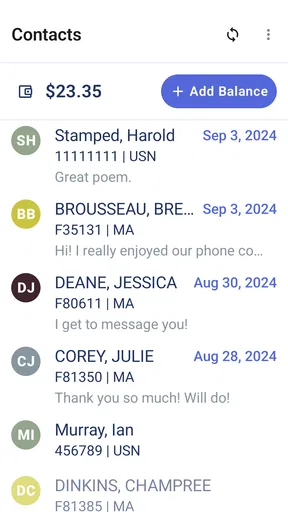
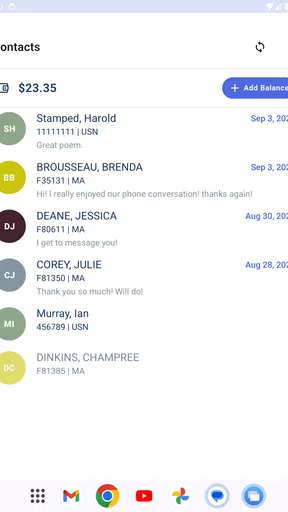
Once you’re in, adding contacts is simple. It’s as easy as entering the inmate’s ID and waiting for them to approve your request. The approval process might take a bit, but once that’s done, you’re all set to chat away!
Worth Reading Before You Choose

Flipboard Shows What News Apps Must Do Beyond the Feed

Switching to Android Auto Means Rethinking Your Driving Routine

Google Calendar Makes a Crowded Week Easier to Manage

Ludo King Makes the Most of the Minutes Between Plans

Baby Panda World Brings Quick Play to Modern Phones, but Its Game Library Feels Busy

ESPN’s Live Game View Makes Following Close Games Easier
What the chat format changes—and what it doesn’t
One practical tip is to treat the contact approval stage as part of setup, not as a sign that the app is malfunctioning if you cannot start a conversation immediately. I would enter the details carefully, then allow time for the request to be handled before troubleshooting the app itself. If a family member is helping with setup, it is worth agreeing in advance on which account and contact details to use; that prevents people from making duplicate requests or waiting on different accounts without realizing it.
Compared with ordinary SMS or a broad messaging service, CorrLinks is narrower but purpose-built for this connection. Mainstream apps are the easier choice for friends who can freely install the same service and message without an institutional approval step. CorrLinks is the more relevant option when the person inside depends on this channel. Compared with letters, chat is better suited to shorter exchanges and follow-up questions, while a letter may still feel better for a long, reflective message that does not need a quick reply.
It also helps to decide what belongs in a chat before you begin. I would use it for everyday check-ins, practical questions, and small family updates, while saving especially sensitive or complicated topics for a conversation whose rules and privacy expectations I fully understand. Since communication is monitored, assume that messages are not private in the same way as a personal conversation between two phones. That awareness is not a reason to avoid ordinary, supportive contact; it is a reason to choose words thoughtfully.
Features That Stand Out
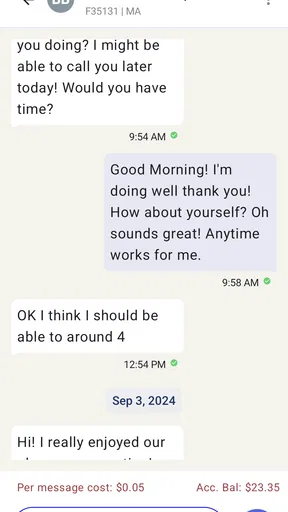
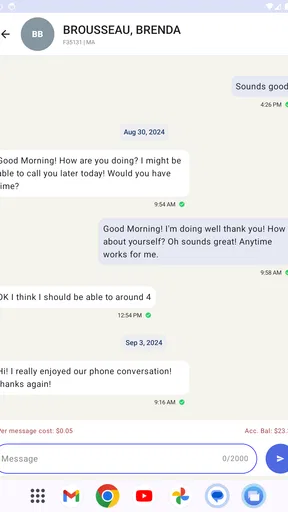
One of the standout features of CorrLinks is its real-time chat capability. This feels like a game-changer, especially when compared to the old-school snail mail or even delayed emails. It’s as close to a normal texting experience as you can get in this context. The app sends notifications for new messages, so you’re always in the loop.
The interface is clean and minimalistic, which I found to be quite refreshing. You don’t get distracted by unnecessary bells and whistles. Instead, the focus is purely on the conversation, which is what truly matters here.
Another great feature is the ability to send attachments. While there are restrictions on the type of files you can send, having this option is still a big plus. It allows for a richer, more engaging exchange of information.
Making messages easier to manage
Notifications can be helpful, but I would not let them become the only way I keep track of an important exchange. A phone may be muted, offline, or busy when a message arrives, so checking the conversation directly is a sensible habit if you are waiting for something meaningful. If you share a device with family members, consider how message previews appear on its screen; a notification can expose a private message to anyone nearby, even when the conversation itself is intended for one person.
Attachments can add context that plain text cannot, but the restrictions mean I would not build an important plan around sending a particular file. Before composing a message around a photo or document, consider whether a short written explanation would still make sense if the attachment cannot be sent or viewed. That small adjustment makes the exchange less frustrating and keeps the main point clear.
For a realistic routine, imagine a relative checking in during a lunch break. They can send a brief update about a family event, ask a simple question, and return to work rather than setting aside time to write a full letter. Later, if the other person replies, the relative can respond when available. That is a useful middle ground between waiting for traditional mail and expecting both people to be online at the same moment. It is still wise to agree on a general expectation for replies, because a chat interface alone cannot guarantee that someone will see or answer a message right away.
Security and Privacy
Security is always a concern when dealing with communication apps, especially in this context. CorrLinks does a decent job at ensuring your conversations are secure. The app requires a PIN to log in, which adds an extra layer of protection. However, it’s important to remember that all messages are monitored by prison officials – something to keep in mind when chatting.
That monitoring changes how I would use the app. I would avoid treating it as a place for private passwords, financial account details, or anything that should only be shared confidentially. The PIN is useful for limiting access to the app on your device, but it does not make the conversation equivalent to an encrypted personal chat with a friend. If the phone is used by other people, lock the device as well and be cautious about leaving a conversation open.
Who is likely to benefit most
I would recommend considering this app if CorrLinks is the communication route available to your incarcerated family member or friend, you want a chat-style exchange, and you can accept the contact approval process and monitoring. It can also suit people who find that short, frequent updates are easier to keep up with than long letters. Those small exchanges can help relatives stay involved in ordinary life, not only major events.
On the other hand, I would skip it if you are looking for a general-purpose messenger, need guaranteed immediate delivery, or expect private, unrestricted communication. It is also a poor fit if you cannot establish an approved contact connection. In those cases, use the communication method that is actually available to the person you want to reach; a familiar mainstream chat app is only a better alternative when both people can use it.
Security and privacy in everyday use
Because conversations may be monitored, I would keep the tone and content appropriate for a channel that is not fully private. A simple practical habit is to pause before sending: would this message still be comfortable if it were reviewed under the communication rules? That is especially useful when several relatives share responsibility for keeping in touch, since everyone can follow the same expectations and avoid accidentally sharing information that does not belong in this channel.
If a message seems delayed, I would separate the possibilities before assuming the app has failed. Check whether the contact connection is established, whether the device is connected, and whether the person on the other end has had a chance to respond. The approval process and institutional context can affect the pace of communication, so patience is part of using this service realistically. For urgent news, use another suitable route rather than relying on a chat notification as an emergency alert.
Performance and Compatibility
In terms of performance, I found CorrLinks to be pretty reliable. The app runs smoothly without any noticeable lags, which is crucial for maintaining a fluid conversation. It’s compatible with both Android and iOS, making it accessible to a broad audience.
One thing to note, though: the app is not free. There’s a small fee involved, which might be a drawback for some. However, considering the service it provides, I think it’s a fair trade-off.
What version history can—and cannot—tell you
The app was released on September 11, 2024, and version 3.4 is the current version. That gives existing users a concrete point of reference when comparing the version on their device with the one they expect to use. I would keep the app reasonably current, especially if a login or conversation issue appears, but I would not assume a version number by itself means a particular feature has changed. The practical test is whether the app opens, your account works, and your approved contact is available.
For people already using CorrLinks in a browser, the option to use existing credentials makes the app a more convenient way to access the same account rather than a reason to start over. Before switching devices or helping a relative sign in, make sure you know which account is being used. That simple check can prevent confusion about contact requests and where a conversation is expected to appear.
Looking ahead, I would judge future changes by whether they make the core routine clearer and more dependable: signing in, seeing the right conversation, and understanding when a contact request or message needs attention. Those are the details that matter more here than a crowded feature set. Until a change is visible in the app itself, I would treat it as something to watch rather than assume it is already available.
Final Thoughts
All in all, CorrLinks Text Chat is a solid choice for anyone looking to maintain communication with someone in prison. It’s user-friendly, efficient, and does what it promises without any unnecessary complications. While there’s a fee, the benefit of near-instant communication is well worth it for most users.
If you’re in a situation where staying in touch with an inmate is essential, I’d definitely recommend giving CorrLinks a try. It’s a small investment for a big peace of mind.
Pros
- Real-time communication with inmates.
- Simple and user-friendly interface.
- Secure encryption for privacy.
- Available on both Android and iOS.
- Reliable notification system.
Cons
- Requires paid subscription for full access.
- Limited customization options.
- Occasional connectivity issues reported.
- No video chat functionality.
- Notifications can be delayed.
FAQs for CorrLinks Text Chat
What is CorrLinks Text Chat and how does it work?
CorrLinks Text Chat is a messaging app that allows users to communicate with inmates in federal prisons. The app facilitates real-time text communication, making it easier to stay in touch. Users must have an account and be approved by the inmate to start chatting. It offers a secure line of communication, ensuring privacy and safety.
Is CorrLinks Text Chat free to use?
While downloading the CorrLinks Text Chat app is free, there may be costs associated with using the service. Inmates are charged a fee to send messages, and external users might need to purchase credits for certain features. It's advisable to check the app for a detailed fee structure before using the service.
How secure is the communication on CorrLinks Text Chat?
CorrLinks Text Chat provides a secure platform for communication, respecting user privacy. All messages are monitored by prison authorities to ensure compliance with regulations. While this means that conversations are not private, it ensures safety and security for both parties involved. Always be aware of the terms and conditions regarding monitoring.
Can CorrLinks Text Chat be used on both Android and iOS devices?
Yes, CorrLinks Text Chat is available for both Android and iOS devices. Users can download the app from the Google Play Store or Apple App Store, making it accessible to a wide range of users. Ensure that your device meets the necessary system requirements for optimal performance.
What should I do if I encounter issues with CorrLinks Text Chat?
If you experience any technical issues with CorrLinks Text Chat, you should first check for app updates and ensure your device is compatible. If problems persist, contacting their customer service for assistance is recommended. Detailed support information is usually available on their official website or within the app itself.


